
The Heath H-89 Computer
by Mark Dahmke
BYTE Magazine, August 1980
The Heath H-89 is Heath Company's latest in their rapidly expanding line of desk-top computers. The H-89 has a number of unique hardware features, and the same excellent software support and documentation as the original H-8 8080-based system.
Heath Company is promoting the H-89 as the all-in-one computer, which it most certainly is. It is based on the Zilog Z80 microprocessor, which makes it upward-compatible with all H-8 8080 software. Not only is the computer based on the Z80, but the video display terminal and keyboard subsystem also contains a Z80.
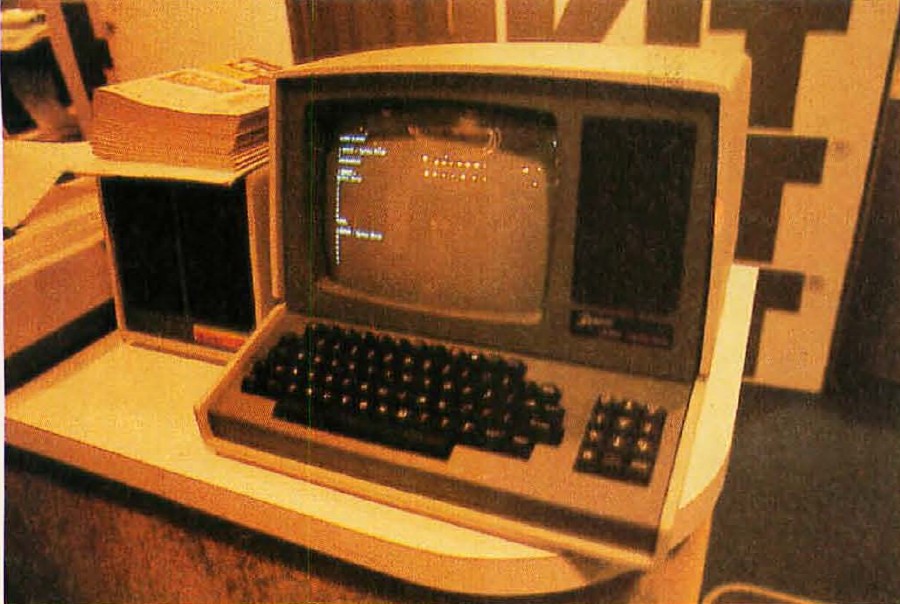
Photo 1: The Heath H-89, a Z80-based all-in-one personal computer with built-in 5-inch floppy-disk drive, WH-19 terminal, and 16 K bytes of programmable memory (expandable to 48 K bytes). The price for the assembled unit is $2295.
The processor board Z80 runs at 2.048 MHz—slightly faster than an 8080 at 2 MHz, but not at the 4 MHz maximum possible with a Z80. Up to 48 K bytes of main memory may be plugged into sockets directly on the processor board, as well as up to six expansion cards on twenty-five pin connectors. The processor board also has single-step and full interrupt logic, a serial RS-232 port that connects to the terminal board, and sockets for three 2708 EPROMs (erasable programmable read-only memories).
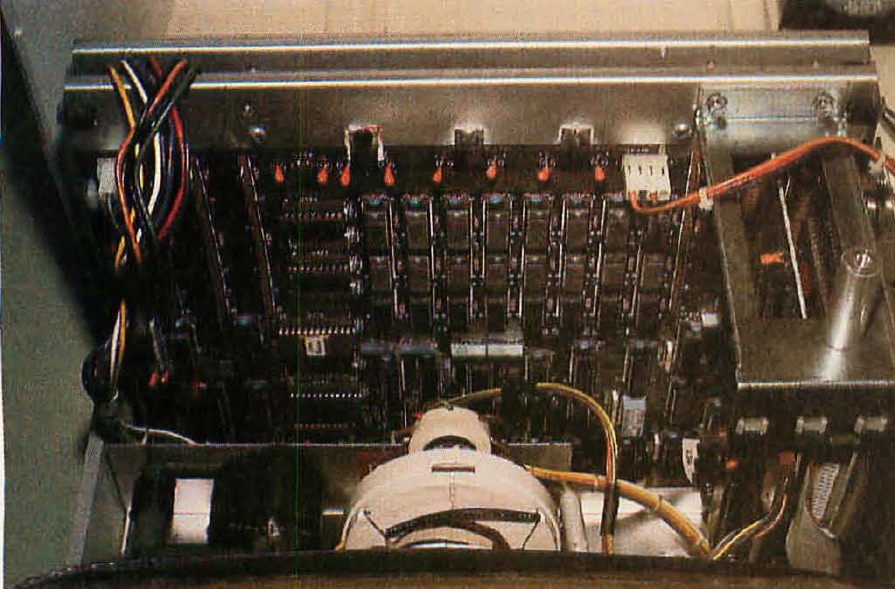
Photo 2: Interior of the Heath H-89 computer.
The terminal board consists of a Z80, a 6845 video controller chip, two read-only memories, two 2112-2 programmable memory components, an S740 keyboard encoder circuit, and an 8250 UART (universal asynchronous receiver/transmitter) for RS-232 communications. The terminal has a 12-inch video screen that displays twenty-four lines of eighty 5-by-7 dot-matrix characters. The twenty-fifth line is accessible under software control for special applications. Lowercase descenders and thirty-three 8-by-10 dot graphics characters are also provided.
A full keyboard with repeat key (this repeats any key pressed), eight user-definable function keys (see table 1), and a separate numeric keypad are standard on the H-89. The special function keys generally send out a series of characters such as ESC H for cursor home, ESC E for erase screen, and so on. Although Heath has its own set of escape functions, the terminal may be placed in the ANSI (American National Standards Institute) mode for a standardized set of the same functions. The numeric keypad actually has three possible modes: the unshifted numeric mode (normal), the keypad shifted mode, and the alternate keypad mode. Table 2 shows the keycodes for each mode. A complete list of escape sequences is shown in table 3.
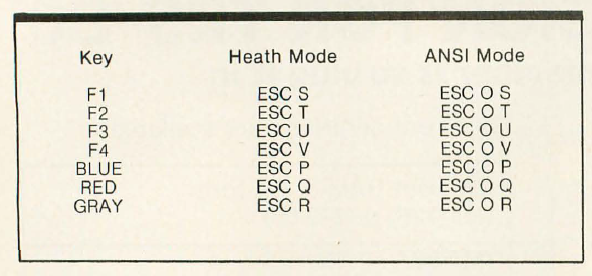
Table 1: Special function keys on the Heath H-89 computer.
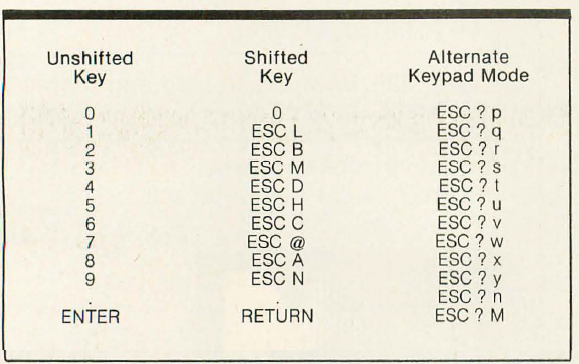
Table 2: H-89 numeric keypad functions.
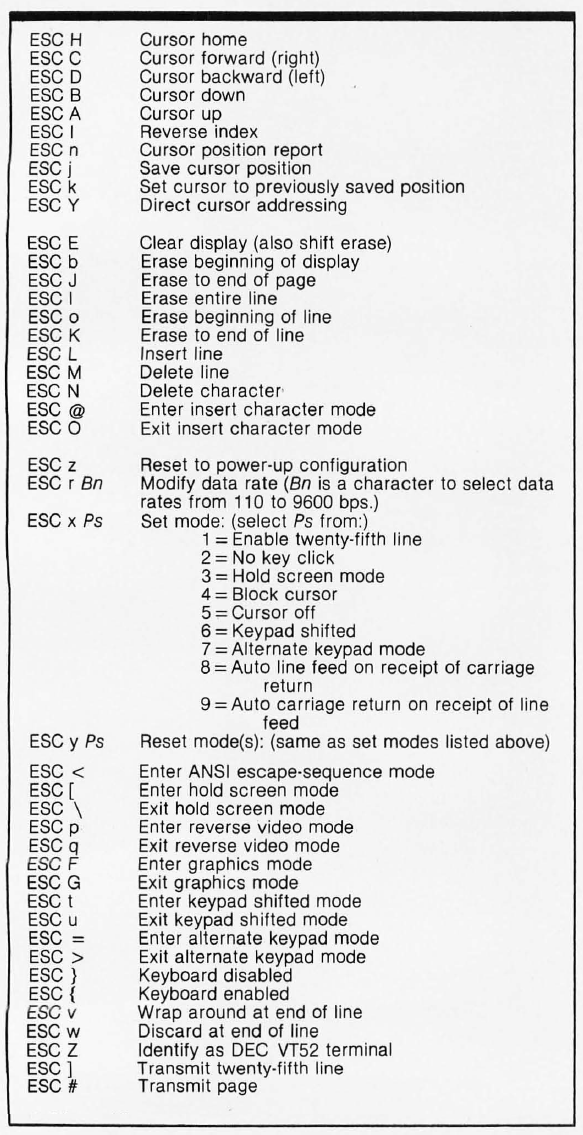
Table 3: H-89 escape sequences.
The ESC r X sequence allows the user to set the data rate from 110 to 9600 bits per second. For example, ESC r C sets the data rate to 300 bits per second. Another nice feature is the special twenty-fifth line of the screen. This line is separate from the other twenty-four and will not scroll with the rest of the screen. The line may be enabled by sending ESC x 1 from either the computer or the keyboard. After enabling the twenty-fifth line, the cursor must be positioned somewhere in the line before writing characters using the direct cursor addressing sequence: ESC Y (line number) (column number) where the line and column numbers are sent as two ASCII characters after the ESC Y. In this case, the line number is 25 + 31 (31 must be added to the actual line and column number values) which is equal to 56 or 8 in ASCII codes. The column number (1 to 80) may range from 32 (ie: 1 + 31) to 111. To position the cursor in column 1 of line 25, the following sequence would be entered via the keyboard or sent from the computer: ESC Y 8 (space)
If the sequence is sent from the keyboard, it is necessary to look up the character equivalents for each value (as above), but if the terminal is driven from a program in BASIC, the process is much simpler:
PRINT CHR$(27); CHR$(56); CHR$(32);
Note that the CHR$(27) causes the ASCII “ESCAPE” code to be sent; 56 and 32 are the line and column numbers, added to 31. The CHR$ function converts the decimal code number into the corresponding character.
MTR-88 Monitor Program
The H-89 comes with a monitor program in programmable read-only memory that allows the user to operate at machine level or use the system without disk drives (or tape, for that matter). The MTR-88 cassette I/O functions are compatible with the cassette entry points in the PAM-8 front-panel monitor of the H-8, so software written for the H-8 will execute correctly on the H-89. The monitor supports the following commands:
- Boot — Load HDOS from disk.
- Dump — Dump a program to cassette tape.
- Go — Execute a program at the given address.
- Load — Load a program from cassette tape.
- Program Counter — Set the program counter address (prior to entering the Go command).
- Substitute — Inspect or change memory locations.
The load and dump commands are set up to work with the H-88-5 cassette interface board. MTR-88 also maintains a tick counter in memory. The counter is a 2-byte field at memory addresses 040.033 and 040.034 (in split octal notation) that is incremented by 1 every 2 ms as long as interrupts are enabled. It is possible to assign interrupt vectors for special applications (as with all Heath software) by changing the addresses in the bottom 64 bytes of memory.
HDOS Disk Operating System
HDOS (Heath Disk Operating System) is a comprehensive disk-management package. HDOS allows the user to create, manipulate, and display the contents of disk files and the disk directory. Other commands allow the user to display disk statistics (ie: usage, remaining space, errors) and to set device options such as console/printer data rate, whether or not a back-space cursor function is available on the terminal in use, uppercase or upper/lowercase mode, tabs, console width, and so on. HDOS provides special subroutines, “device drivers,” which perform all necessary initialization and housekeeping functions for each peripheral interface—console, line printer, alternate console, and so on. The device drivers may be called by the user's program, saving the user the effort of writing device interface routines. All devices on the H-89 have been assigned device names. Table 4 lists all devices. For example, to list a file on the printer, the command
COPY LP: = SY0:FNAME.EXT
is used, where LP: is the destination, and FNAME.EXT is the disk file on device SY0: to be listed.
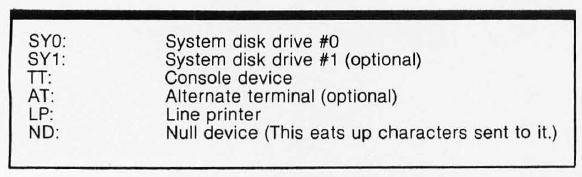
Table 4: H-89 device assignments in HDOS.
The two directory-oriented devices are SY0: and SY1:. On these devices (ie: disks), the directory keeps track of what files exist and where they are. Each file can have an eight-character name with a three-character extension. The extension is useful when keeping track of a number of related files. For example:
MYPROG.ASMMYPROG.LSTMYPROG.ABS
Here the .ASM indicates that the first file is the assembler source of MYPROG entered via the text editor. The .LST file is the listing output of the assembler, and .ABS is the object code resulting from the assembler run.
HDOS Utilities
HDOS also comes with a number of useful utility programs:
- PIP — (peripheral interchange program) A generalized disk-file maintenance program.
- ONECOPY — A program that allows the user with only one disk drive to copy files from one disk to another.
- SET — A very useful program that allows the user to redefine device driver configurations. Table 5 lists all options of the SET command.
- STAT — Displays system performance, number of disk errors, etc.
- FLAGS — Sets disk-file flags to write-protect a file, to suppress normal listing and copying of a file, and (optionally) to lock the file against further flag changes.
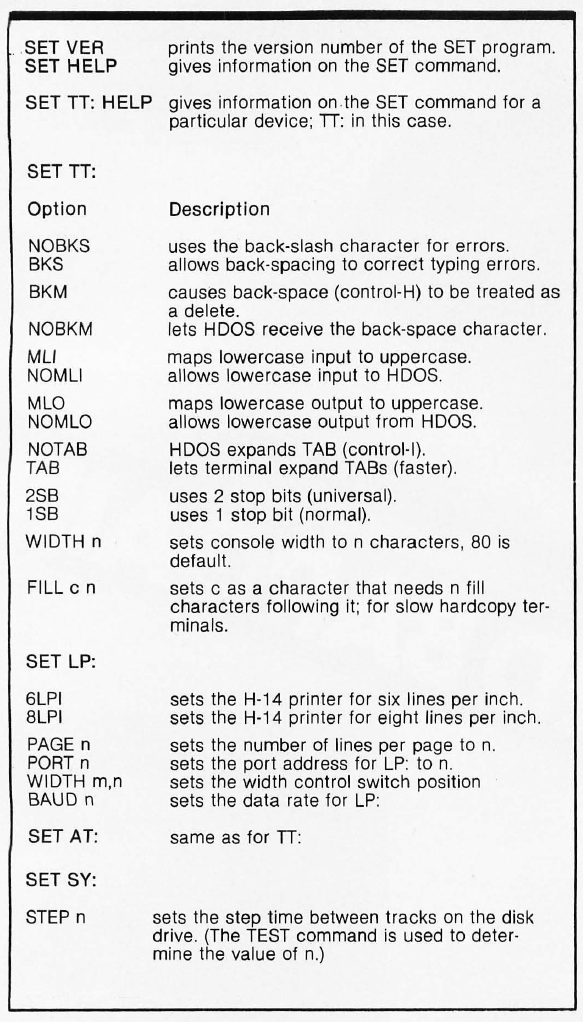
Table 5: SET command options.
DBUG
The Heath console debug program allows the user to enter and debug machine-language programs from the console. DBUG will perform the following functions:
- Display and alter contents of any memory location.
- Display and alter contents of any 8080 processor register.
- Single step through a program.
- Execute a program.
- Set breakpoints in a program.
- Load or dump user programs to or from a device (eg: tape or disk).
Note that DBUG supports only the 8080 register set, not the extra registers in the Z80. Also, DBUG does not have a disassembler feature.
The Text Editor
The Heath Text Editor is used to enter and edit assembly and BASIC programs, as well as to create and edit reports, letters, and manuscripts. EDIT uses all available memory in the system as a text buffer. When the buffer is full, all or part of it may be transferred to a disk file. This allows the user to work on files in size up to the limit that will fit on disk. EDIT has a very unusual command format:
<range> <verb> <qualifier string> <option> <parameters>
Range defines the buffer lines the command is to operate on. Characters to indicate certain lines are as follows:
1— Defines the first line of the buffer.$— Defines the last line of the buffer.+— Followed by a decimal number, refers to the nth line past the current line pointer.-— Followed by a decimal number, refers to the nth line preceding the current line pointer.+'string'— The first line in the buffer which contains the 'string' after the current line.-'string'— The first line in the buffer which contains the 'string' preceding the current line pointer.
Multiple line ranges can be specified by using two of the above range expressions in sequence with a comma between them. A blank preceding a verb will cause the command to operate on the entire buffer. An equals sign reuses the range of the last command. The verb specifies the action to be taken by the editor. Examples are: Print, Replace, Delete, Read, Write, Use, Search, Bye, and so on.
The qualifier string is a further restraint on the range expression and is optional. For example, it is possible to operate on only those lines that contain a phrase or string of characters. If the phrase is entered in single quotes in the qualifier string field, only those lines containing the specified string will be affected.
The option field determines if the current line is to be displayed before it has been modified, after it has been modified, or both. Use of this field is optional. The parameter field is a special field used to direct disk I/O actions of the editor.
This is the most difficult editor I have ever tried to work with. Even after carefully reading the manual and spending a great deal of time learning how to use it, it is incredibly frustrating. The range and other fields are unconventional and require some getting used to. When writing programs in BASIC, it is far easier to use the line entry and edit commands in the BASIC interpreter. Trying to write assembler programs with this editor is nearly impossible. Considering all the excellent software and hardware documentation and support of the H-89, and the powerful intelligent terminal features for full-screen editing, it seems incongruous that this system should have such a difficult editor to work with.
The Assembler
The Heath Assembler is a very straightforward, absolute 8080 assembler (not Z80) with most of the standard assembler directives (ie: DB, DS, DW, END, EQU, ORG, SET, TITLE). The XTEXT directive is used to include whole disk files of assembler text into a program. This is convenient if there are some standard symbols or memory addresses that are to be incorporated into every assembler program, such as HDOS definitions. Also, useful subroutines may be included in this way. This feature may be used as a macro-instruction library facility because the assembler does not allow macro-instruction definitions. A file comes with HDOS called HDOS.ACM. It contains standard HDOS system-call symbols for easily interfacing a user-written program with HDOS and the device drivers.
Extended Benton Harbor BASIC
Extended Benton Harbor BASIC (herein referred to as EBH BASIC) is Heath's own version of BASIC. It is an extension of Dartmouth BASIC with some unique features. One of the first differences I noticed was the command that initiates automatic line numbering while entering programs. In most versions of BASIC it is called AUTO, but in EBH BASIC it is BUILD. The BUILD command works exactly like AUTO. Another important difference is the lack of a RUN “FNAME” command. If the user wishes to execute a program that is on disk as the file “FNAME”, the following must be entered:
OLD "FNAME"RUN
To clear the machine of program and data, the command is SCRATCH, not NEW as in most versions of BASIC. EBH BASIC has some unique and useful commands. (Table 6 lists these special commands and their functions.) But it is not without its problems. Even the most insignificant of syntax errors, such as leaving out a comma or right parenthesis, causes EBH BASIC to display a simple SYNTAX ERROR message. Unfortunately since it has to access a disk file called ERRORMSG.SYS to get the text of the error message, the user is forced to wait several seconds to find out what he or she probably already knows. The philosophy of storing error-message text on disk to save space in memory is a useful one, but in this case it severely hampers development of programs. The best approach would be to have the most frequently occurring error messages in memory and then access the disk for the remainder.
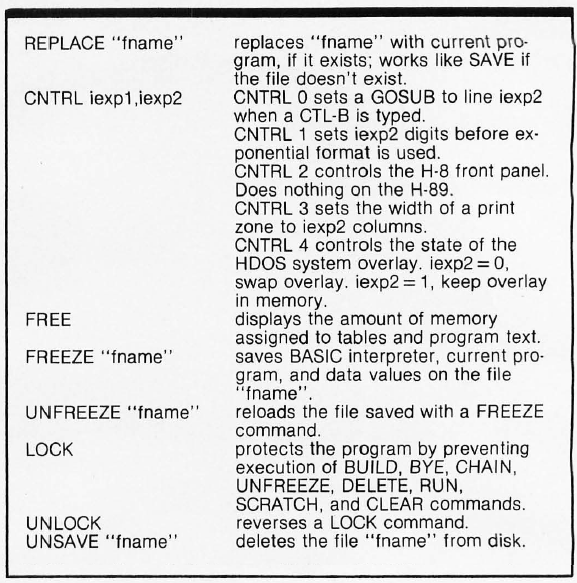
Table 6: Extended Benton Harbor BASIC commands not found in other versions of BASIC.
Microsoft BASIC
Microsoft BASIC is widely used and is very standardized. I will not spend time describing its features. The Heath implementation of Microsoft BASIC does have one significant fault; when a program is loaded from disk, the disk read head is raised and lowered for each and every sector of the file. This produces an annoying banging sound that seems to go on forever. It is also bad for the drive mechanism and will contribute to the wear and tear of the unit.
Conclusions
The H-89 has flexibility and does not require the user to understand anything about the hardware to take full advantage of all the features. One important point remains: after all the HDOS operating system utilities are put on a single 5-inch floppy disk, there is very little room for any large user programs. To make the system really useful, a second disk drive is a necessity. If the H-89 were to be used in a business with a really large data base, the data would be a tight fit even with two drives.